
- Add an Extra Field for a Schema Type
- Enable/Disable Schema Markup
- Add Ratings Using Shortcode
- Disable a Specific Schema Markup
- Add Schema Markup on Subcategories
- Disable the White Label Settings
- Disable Corporate Contact Schema
- Remove Home List Item from Breadcrumblist Schema
- Remove Shop Item Link on Product Page
- How to Export and Import Schema Pro Data
- What is the future of Schema Pro now that SureRank has launched?
- How to Use Schema Pro with SureRank
- Test a Schema Snippet
- Mapping Your Schema Fields
- Add an Extra Field for a Schema Type
- How to Use the Schema Pro plugin?
- All-in-one Schema Pro plugin
- Map Required fields with Custom Fields
- Create a Custom Fields
- Target Specific Areas of the Website
- Enable/Disable Schema Markup
- Add Ratings Using Shortcode
- Implement Breadcrumbs
- Disable Schema Markup on AMP Pages/Posts
- Plugin Settings for Schema Pro
- Restrict Schema Pro Settings for Specific User Roles
- Remove Home List Item from Breadcrumblist Schema
- Delete Your Schema Data
- Regenerate Schema
- Configure Schema on a Single Page/Post
- Skip Rendering Invalid Schema
- Handle Errors & Warnings in a Testing Tool
- Configure WooCommerce
- Repeater Fields Controls on Pages/Posts
- WooCommerce Review Field Schema Markup
- Custom Schema Markup
- Compatibility with External plugins
- Rollback Schema Pro Plugin to Previous Version
- How to White Label Schema Pro
- Important Update: Sitelinks Search Box Deprecation
- Knowledge Graph with Schema Pro
- Configuring WooCommerce with Schema Pro Plugin
- How to Add a Schema markup for an Article on your website?
- Difference Between the Free and Pro Plugin?
- How to map fields with custom fields from third party plugins?
- Accept User Ratings from Users
- Update Schema Pro
- Register Your Copy of Schema Pro
- Organization Type in the Setup Wizard
- Schema Pro Setup Wizard
- Getting Started With Schema Pro
- How To Install Schema Pro Plugin
- Schema Markup for a Dataset Page
- Schema Markup for a Profile Page
- Schema Markup for a Discussion Forum Page
- Schema Markup for a Q&A Page
- Schema Markup for an Event page
- Schema Markup for a Review page
- Schema Markup for a Local Business Page
- Schema Markup for a Service Page
- Schema Markup for a Product Page
- Schema Markup for a Course page
Enable/Disable Schema Markup
Schema Pro plugin provides the following filter that helps you to enable or disable schema markup on single page/post.
Filter:
wp_schema_pro_default_markup
Type: Boolean
Default: False
Here is a code that you can directly add to your child theme’s functions.php file.
add_filter( 'wp_schema_pro_default_markup', 'my_function' );
function my_function( $bool ) {
  return true;
}
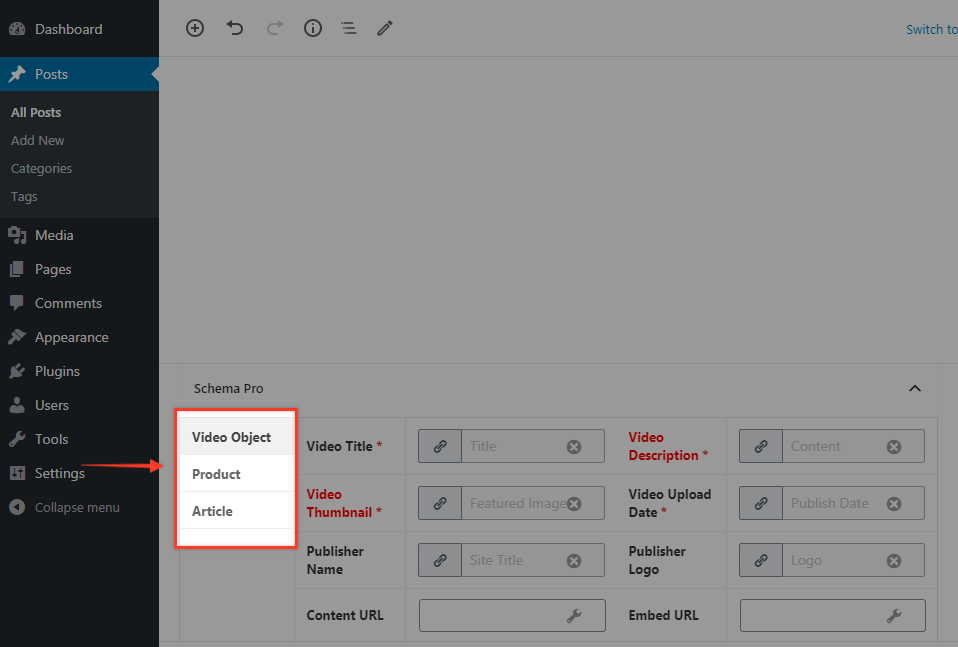
Before: When you edit single post/page here is how schema settings will look –
After: Once you add code and edit a single post/page, you will see a toggle to disable schema. If you have implemented multiple schema types on the same page then you will see options individually.
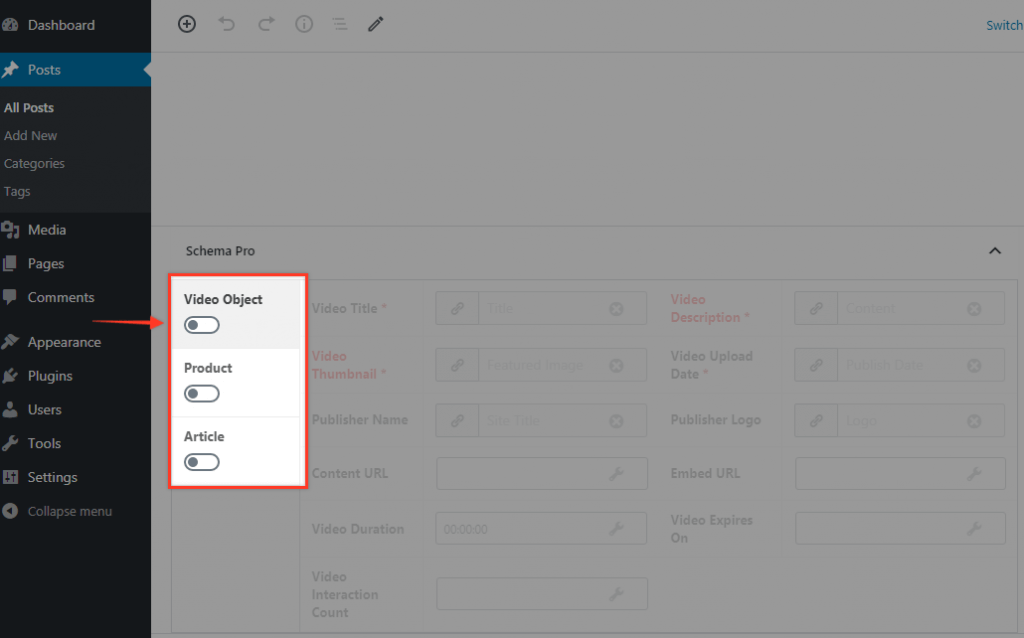
Note: By default, the toggle will be OFF. That means when you add filter code, your schema will be disabled. You can enable the required schema on the post/page.
We don't respond to the article feedback, we use it to improve our support content.